3x faster project loads with the origin private file system

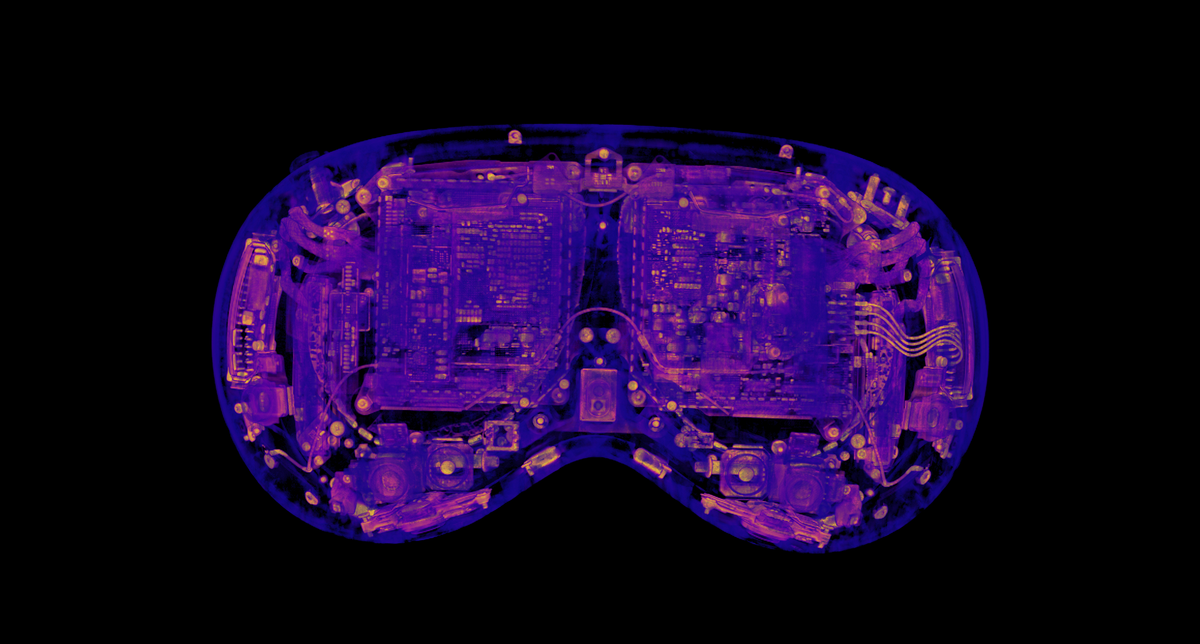
A typical Voyager project contains over a gigabyte of data including 3D volumes, high-poly meshes, and stacks of radiographs; we recently cut the median load time from 21 seconds to 7 seconds. The key was a browser storage API that's quietly forming the performance backbone of data-intensive web applications: the origin private file system.
Loading an Apple Vision Pro scanned on a Lumafield Neptune, before and after caching.An An A
Web storage APIs
When optimizing data transfer, all roads lead to caching. Modern browsers support five approaches for storing data client-side, each optimized for different use cases and data types. The MDN docs lay them out well:
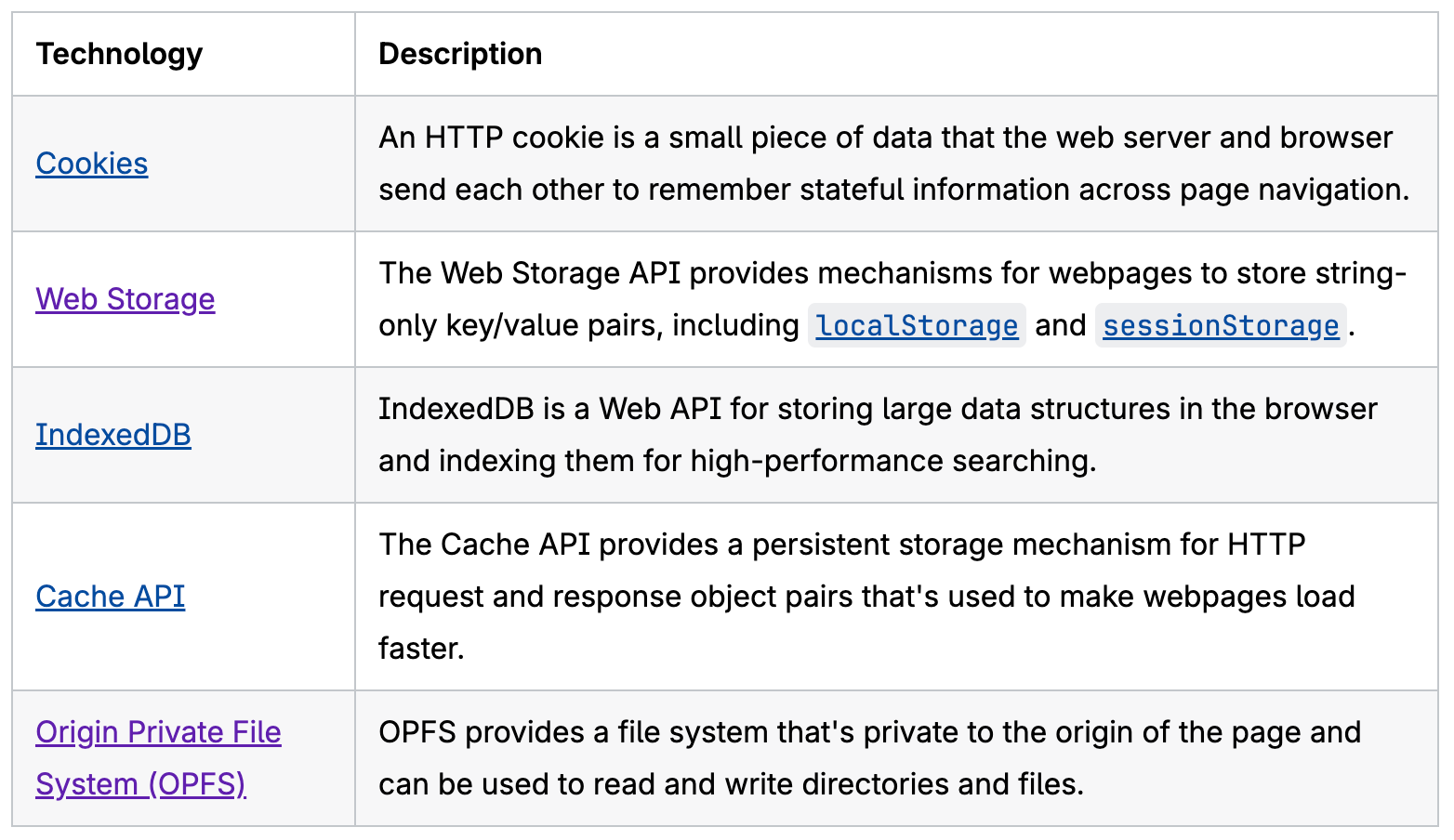
The data we need to cache for Voyager is large enough to rule out Cookies and Web Storage, which are limited to around 4KB per cookie and 5MB per origin, respectively. While IndexedDB can store more data, it incurs overhead on large ArrayBuffer objects due to serialization and other transaction costs, making it significantly slower than our two serious contenders: the OPFS and the Cache API.
The origin private file system
The Origin private file system API gives browser origins a private, sandboxed filesystem, making it a natural fit for the large, immutable files Voyager loads.
It's worth clarifying the difference between the OPFS and the File System Access API. The latter allows websites to access the user-visible file system, such as your Desktop/ directory. But with great power comes great responsibility. The File System Access API requires many security checks which degrade both performance (it writes to temporary files and then copies to disk, rather than writing in-place) and user experience (intrusive user permission dialogs are required for all operations).
The OPFS, on the other hand, doesn't require user permission dialogs and doesn't write to the user's filesystem. It's tailor-made for high-performance read/write operations and is significantly faster than the File System Access API or any other browser storage solution.
Why not the Cache API?
The HTTP Cache API is commonly used for caching images, videos, and other static content, and it's even explicitly recommended over the OPFS and IndexedDB by the Chrome team for storing AI models:
 GitHub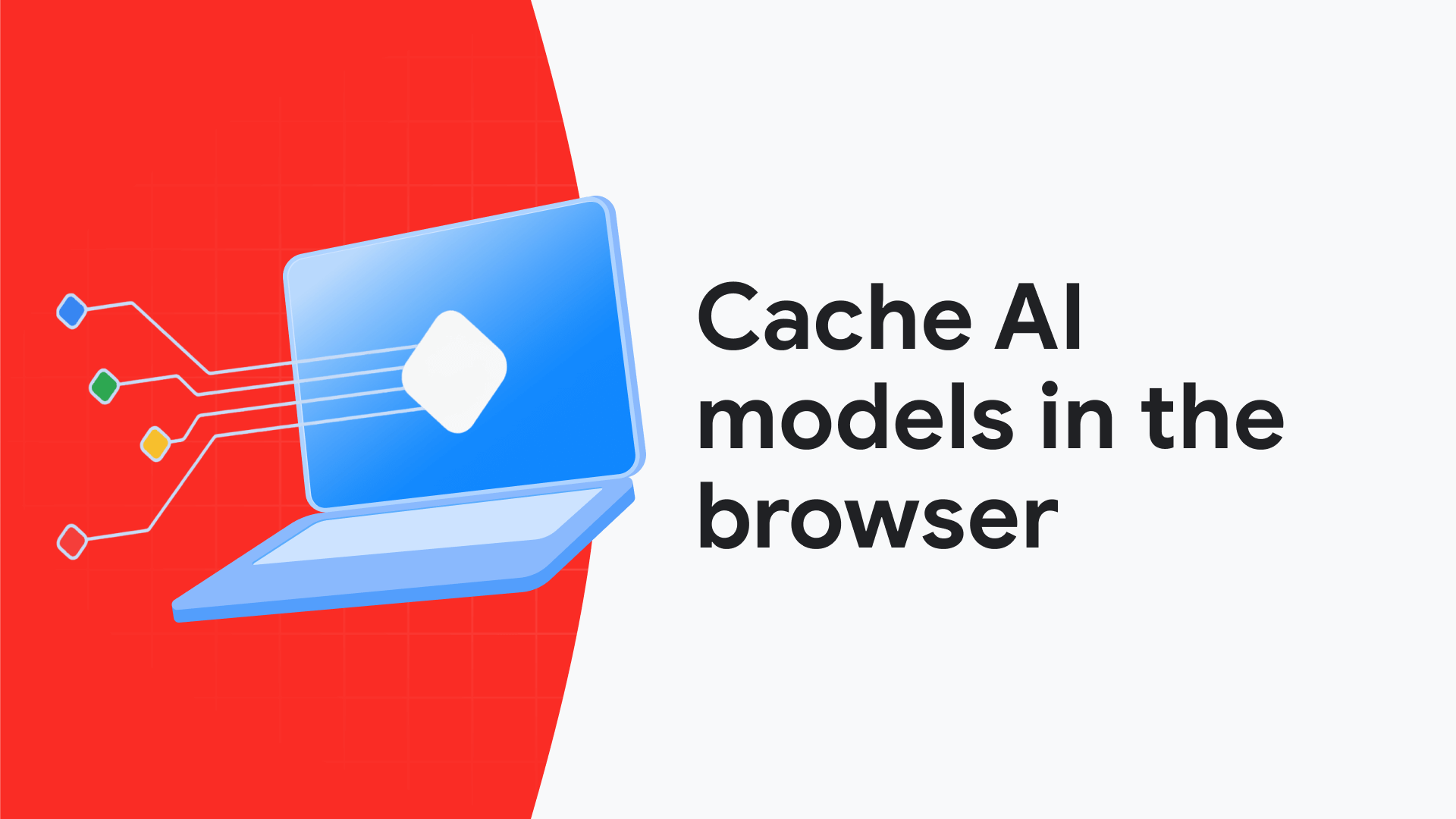
We leaned away from the Cache API for a few reasons:
- Presigned URLs: We use pre-signed URLs to fetch resources from S3, which embed authentication credentials like
X-Amz-Signature,X-Amz-Date, andX-Amz-Expires. The Cache API matches based on full URLs, so every freshly signed URL is treated as a new resource. It's possible to get around this with custom matching logic, but that eats into the simplicity advantage over the OPFS. - Caching derived and computed data: The files we load from S3 are immutable, but we do some client-side transformations or derive additional data (for example, computing gradient magnitudes for volumetric rendering). Similar to the custom matching logic, we could construct wrapping
Request/Responsepairs, but we began to feel we were fighting the semantics of the API. - Partial reads and writes: The origin private file system provides the ability to read and write at arbitrary byte offsets (e.g. streaming an individual slice or section of a volume). We didn't implement partial read/writes for our implementation of the OPFS, but have several future use cases in mind.
- File semantics: Our data is file-based, so we wanted to store it as files. This provides non-trivial benefits beyond readability. For example, cached files can be downloaded directly via the OPFS Explorer, which is useful for debugging. It's also easier and faster to get the size of cached files (
file.sizefor OPFS vs(await response.blob()).sizefor the Cache API, which reads the whole file into memory).
To be sure, the Cache API should be seriously considered by anyone looking to store data in the browser, especially if the data maps cleanly onto Request/Response pairs and partial read/write operations are not required. This article provides another point of view on when to use various browser storage solutions.
A two-tier cache architecture
Binary data in the OPFS is just a blob. It tells you nothing about what project a file is associated with, what version the data is, or when it was cached. To support fast cache lookups, data versioning, and a custom eviction policy, we designed a two-tier architecture: a CacheEntry records metadata while binary data lives in OPFS inside per-key directories.
export interface CacheEntry {
  key: string;
  /** Discriminator (e.g. "volume", "mesh"). */
  type: string;
  /** Entries at a different version are discarded on read. */
  version: number;
  /** Record of blobs stored in OPFS. */
  blobs: Record<string, BlobInfo>;
  createdAt: number;
  /** Timestamp of when this entry was last accessed. */
  lastAccessedAt: number;
  /** The project id this entry is associated with. */
  projectId: string;
}
A CacheEntry interface for metadata
Our first instinct was to store cache entries in localStorage, and we would recommend this approach to anyone building a similar large file store. Unfortunately Voyager already uses localStorage for other data and we ran into other constraints specific to our application, so we turned to IndexedDB. As mentioned earlier, it's slow for large blobs, but it's great for storing structured metadata like our cache entries.
Implementing the cache
The core of the implementation is BlobCache, ~300 lines of TypeScript that wrap the OPFS and IndexedDB behind a clean interface:
interface BlobCache {
  getBlob(key: string, blobName: string, knownEntry?: CacheEntry): Promise<ArrayBuffer | null>;
  getEntry<T extends CacheEntry>(key: string): Promise<T | null>;
  put<T extends CacheEntry>(key: string, blobs: Record<string, ArrayBuffer>, entry: Omit<T, ...>): Promise<void>;
  delete(key: string): Promise<void>;
  getAllEntries(): Promise<CacheEntry[]>;
  cleanOrphanedBlobs(): Promise<void>;
  clear(): Promise<void>;
}
Blob caching interface
Each entry can have an arbitrary number of named blobs. For example, a volume cache entry has an attenuations blob. This generality made it easy to add caching for new data types; we started with volumes and quickly added meshes, radiographs, and more. Each data type gets custom, versioned control over the blob(s) they persist and the associated metadata.
Cross-tab race conditions
The OPFS is origin private, not tab private, and Voyager users like their tabs. We serialize writes across tabs with the Web Locks API:
let writeLock = Promise.resolve();
...
if (navigator.locks) {
  await navigator.locks.request('voyager-cache-write', doWrite);
} else {
  // Fall back to a single-tab promise chain if navigator.locks is unavailable (Safari 15.2-15.3)
  writeLock = writeLock.then(doWrite, doWrite);
  await writeLock;
}
Serialized writes with the Web Locks API
Self-healing reads
One of the downsides to our two-tier approach is that the tiers can get out of sync, especially given that all browser storage is eventually at the mercy of the browser. If we detect a cache entry without a corresponding OPFS directory when reading, we simply delete it:
let directory: FileSystemDirectoryHandle;
try {
  directory = await root.getDirectoryHandle(directoryName, {
    create: false,
  });
} catch {
  // Remove entry with missing directory.
  await database.delete(ENTRIES_STORE, key);
  return null;
}

let fileHandle: FileSystemFileHandle;
try {
  fileHandle = await directory.getFileHandle(blobName);
} catch {
  // Remove entry with missing blob.
  await store.delete(key);
  return null;
}

const file = await fileHandle.getFile();
const buffer = await file.arrayBuffer();
const expectedSize = entry.blobs[blobName].sizeBytes;
if (buffer.byteLength !== expectedSize) {
  // Remove entry with incorrectly sized blob.
  await store.delete(key);
  return null;
}

return buffer;
A snippet from BlobCache.getBlob
To handle the reverse case, a simple cleanOrphanedBlobs() function iterates the OPFS tree on page load and removes any directories without a corresponding cache entry.
Eviction policy
Instead of relying on the browser's storage.estimate() for an educated guess at how much space we have left, we defined our own exact usage quota. This gives us more reliable eviction and full control over how much disk space our application uses. When writing to the cache, we first check if the write will bring us over this threshold. If so, we evict all entries associated with the least recently accessed project. This project-level LRU eviction approach mitigates eviction whiplash when users open multiple large projects in rapid succession. It also lays the groundwork for fully offline volume inspection.
Graceful degradation
The OPFS can be unavailable for various reasons such as old browser versions, explicit disablement, or insecure contexts. Implementing BlobCache as a class allows us to return a simple no-op store when the cache isn't available, abstracting this complexity away from cache consumers:
export function createNoopStore(): BlobCache {
  return {
    getBlob: async () => null,
    getEntry: async () => null,
    put: async () => {},
    delete: async () => {},
    getAllEntries: async () => [],
    cleanOrphanedBlobs: async () => {},
    clear: async () => {},
  };
}
A no-op implementation of BlobCache for when storage APIs aren't available.
Using the cache
Voyager data objects are represented by an abstract class with a load function; subclasses (e.g. Volume or Mesh) implement custom loading logic. For the cache, we added two more abstract functions: readFromCache and writeToCache. This allowed us to implement caching one-by-one for each object type, with types that don't support caching yet simply resulting in an instant cache miss.
abstract class DataObject {

  // Loads an object over the network
  abstract load(): Promise<void>;

  // Attempts to read an object from the cache
  async readFromCache(): Promise<boolean> {
    return false;
  }

  // Attempts to write an object to the cache
  writeToCache(): void {}

  // Releases raw data
  releaseRawData(): void {}
}
A portion of the abstract DataObject class
Paired with the graceful degradation approach noted above, the core usage of the cache during project loading becomes incredibly simple:
let cacheHit = false;
cacheHit = await dataObject.readFromCache();
if (!cacheHit) {
  await dataObject.load();
  dataObject.writeToCache();
}
DataObjectRegistry.add(dataObject);
captureLoadEvent(cacheHit ? 'cache' : 'network');
Logic for loading data objects.
Consumers don't need to know whether the cache is available, why a given read did not result in a cache hit, or whether a given write succeeded.
Fire-and-forget writes
Writing to the OPFS is asynchronous (when done on the main thread), but writeToCache returns immediately so that the data can be rendered as soon as the network download finishes.
/**
 * Fire-and-forget write to the blob cache.
 */
writeToCache(): void {
  const key = buildScanCacheKey(this.id);
  getBlobCache()
    .then(async (cache) => {
      await cache.put<ScanCacheEntry>(
        key,
        { [SCAN_CACHE_DATA_BLOB]: this.data.buffer },
        {
          type: 'scan',
          version: SCAN_CACHE_VERSION,
          size: this.size,
          count: this.count,
          projectId: this.projectId,
        }
      );
    })
    // Failed cache writes are ok; fall back to network gracefully.
    .catch(() => {});
}
A fire-and-forget writeToCache implementation
Debugging
Unfortunately, the OPFS isn't very well exposed via the DevTools Panel. We found the OPFS Explorer browser extension to be an invaluable tool while developing and testing.
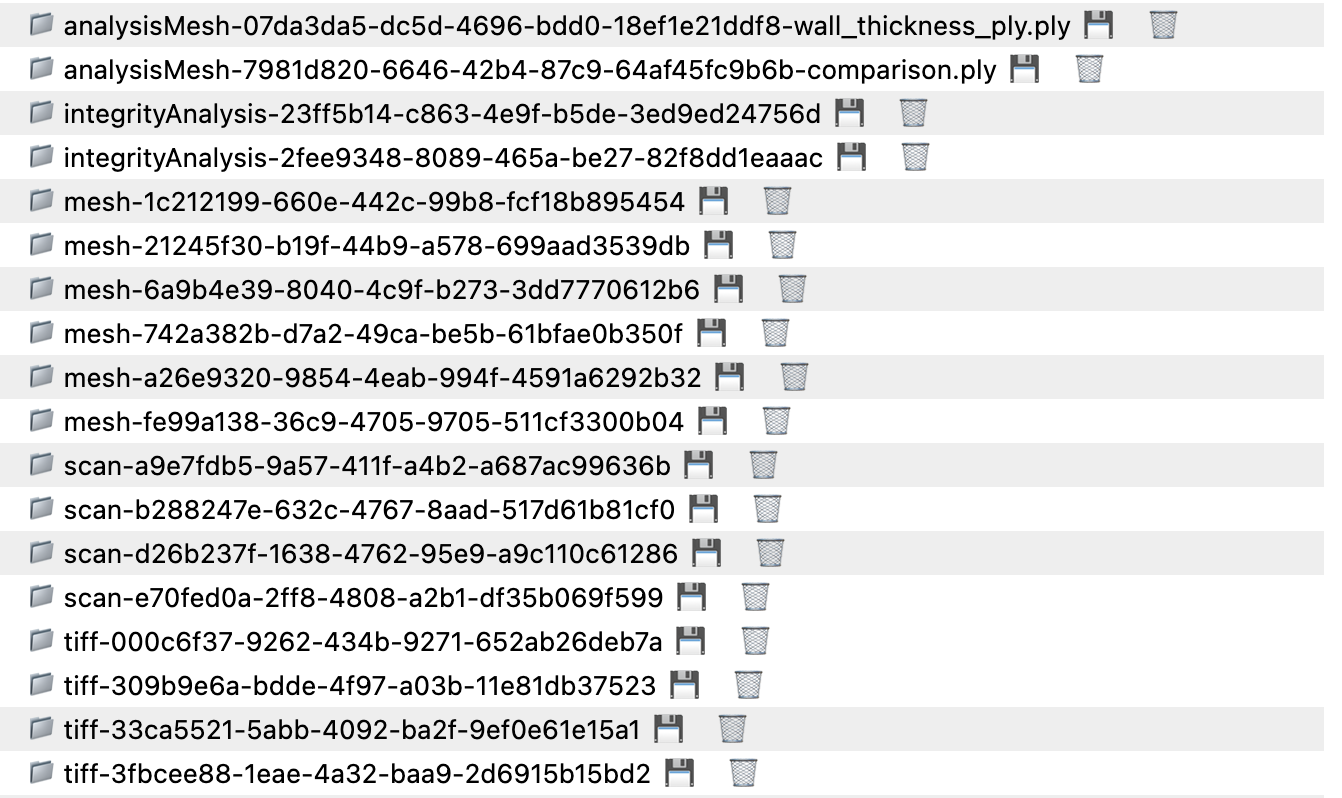
We also attached a singleton to the window to allow cache inspection from the console. It has a stats() method which reports the browser's storage quota and usage via navigator.storage.estimate() and the current cache usage; an entries() method which prints a formatted table of entries and age; and a clear() method for resetting the cache if needed.
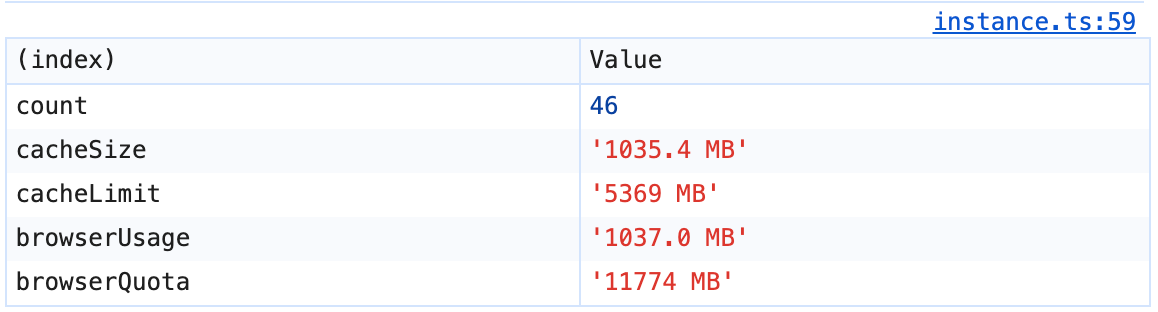
console.table logged by the Voyager Cache .stats() debugging callResults
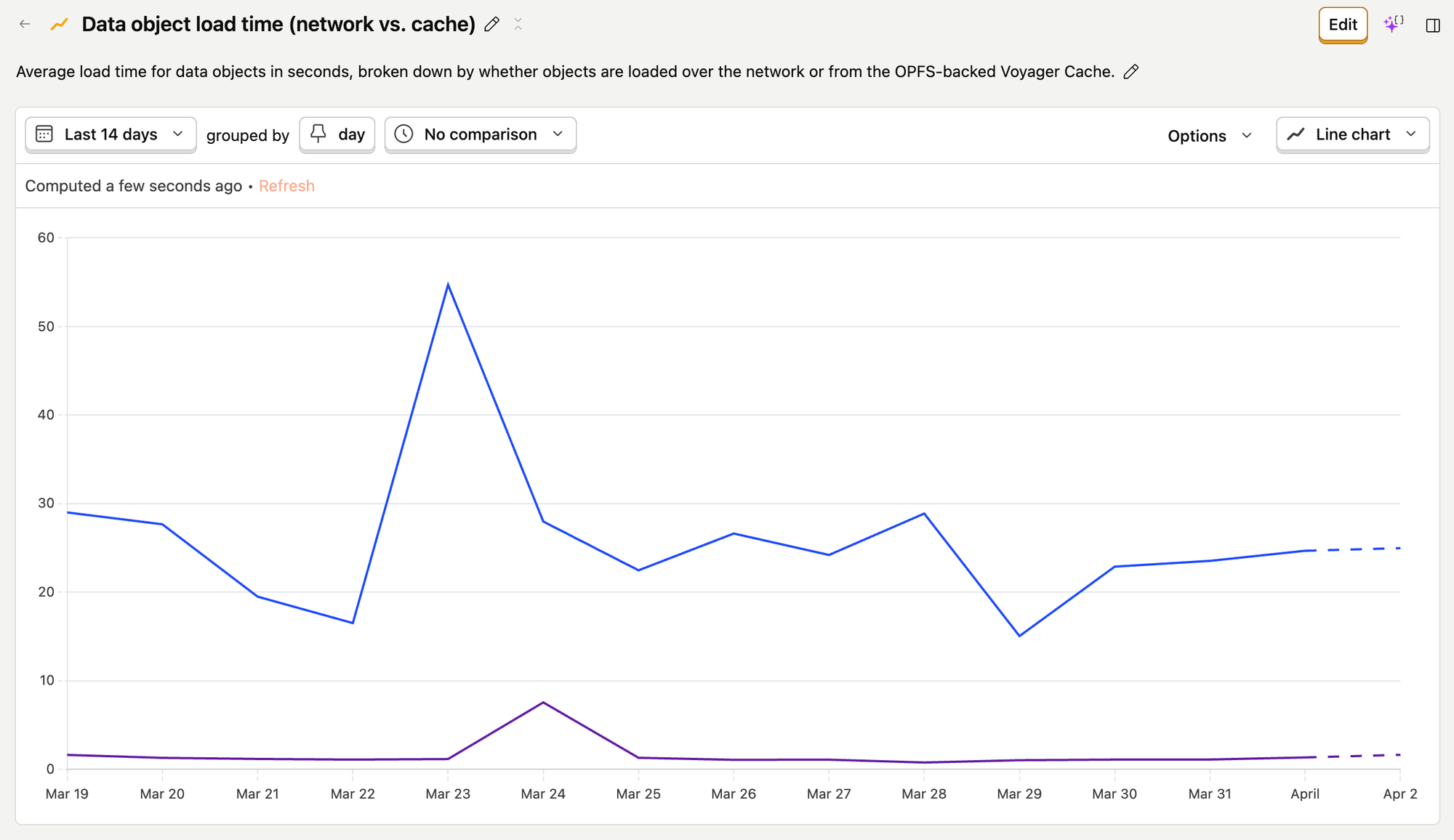
We set up PostHog events and insights to track data object loads based on their source (network vs. cache) and understand how the OPFS was speeding up our project loading.
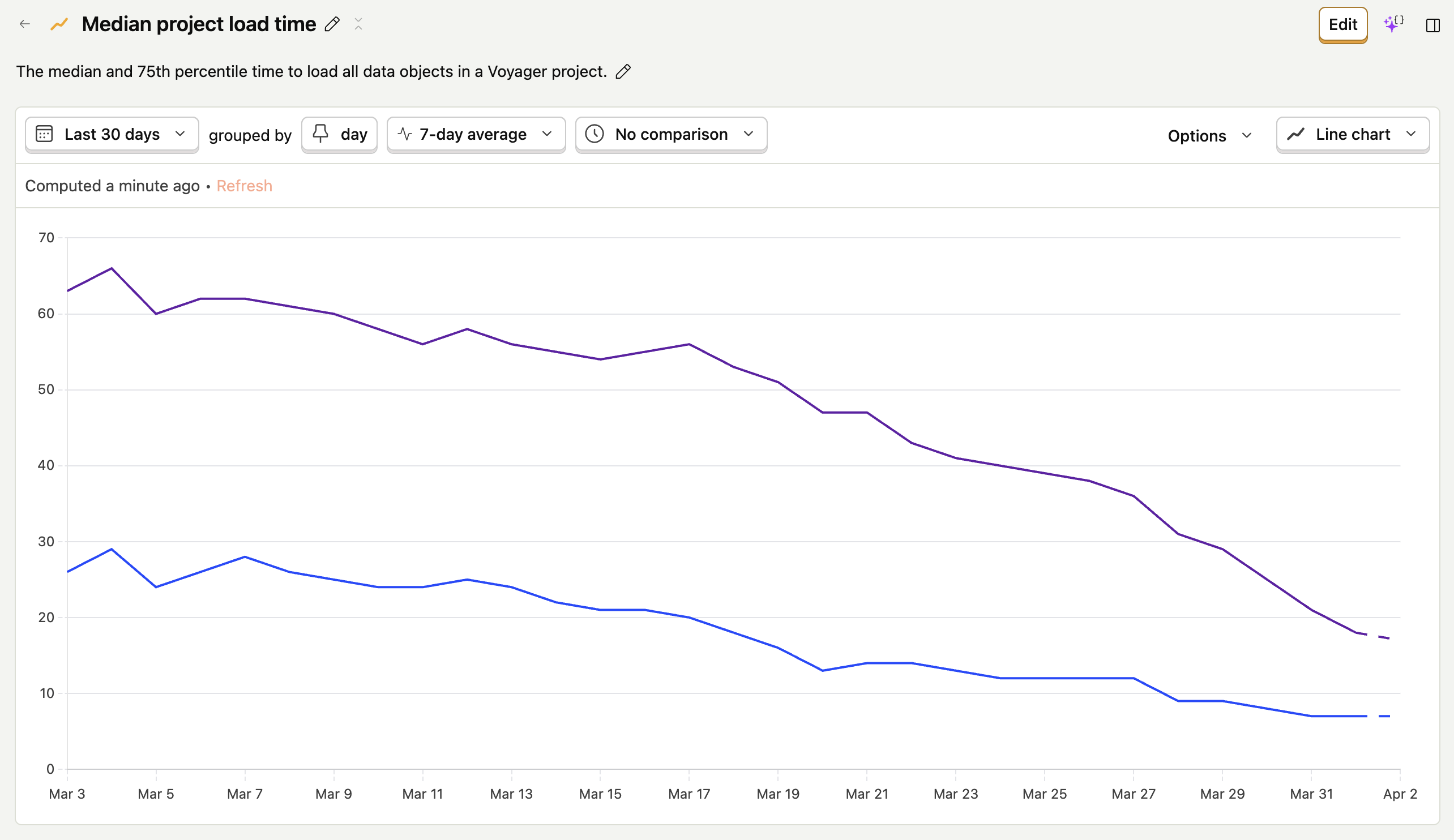
Project load times vary significantly depending on the type and quantity of data in a project and the network speed. Nevertheless, since releasing our OPFS-backed cache, we've seen drastic improvements. The median time to load all data in a Voyager project has dropped from 21 seconds to 7 seconds, and the 75th percentile time has dropped from 55 seconds to 19 seconds. That's a 3x speed improvement in aggregate, despite only ~30% of data object loads coming from the cache.
How does such a small percent of loads account for such a massive decline in overall project load times? Simple: OPFS reads are really, really fast. The average time to read an individual data object from the OPFS is about one second, which is ~30 times faster than the average time to load objects over the network.
The origin private file system enabled a step change in load times for our customers, and the benefits aren't just for humans. Agents thrive on rapid feedback loops, and as they become first-class users of the web we believe the bar for performance will rise, making local data operations essential. We plan to continue pushing the boundaries of what can be done in the browser, and we would love to hear from other companies doing the same!
Additional Resources
 Petr Broz
 LinkedIn
 GitHub